
How to Set Up & Optimize Your Google Business Profile for Plumbers: Step-by-Step Guide
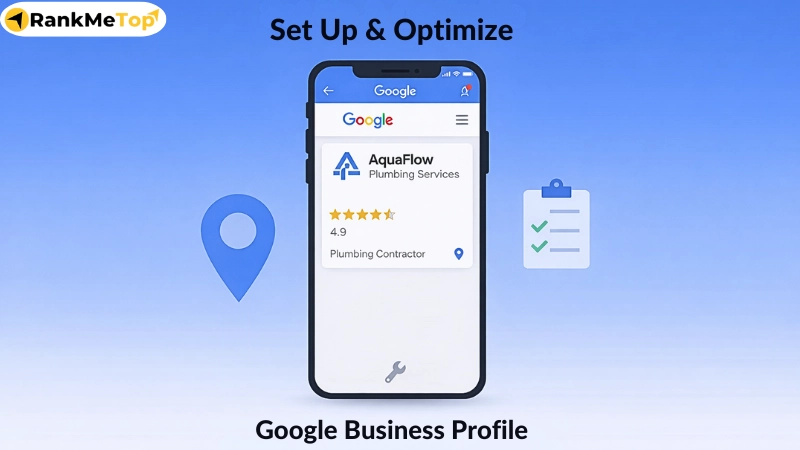
A plumber Google Business Profile (GBP) is a free local business listing within Google that allows plumbing contractors to appear in Google Search and Maps with verified business information. It displays key details such as business name, service area, phone number, operating hours, services, photos, and customer reviews. For plumbing contractors, GBP acts as a digital storefront that connects local customers with nearby plumbers during high-intent searches like emergency plumbing or same-day repairs, enabling direct calls or messages without requiring a website visit.
Proper setup and ongoing optimization of a plumbing GBP play a major role in local visibility, trust, and lead generation. Accurate business details, correct categories, verified ownership, and updated photos help Google match plumbing businesses with relevant local searches. Consistent activity such as publishing posts, responding to reviews, enabling contact features, and reviewing profile insights further improves engagement and performance. When managed correctly, GBP helps plumbing contractors attract nearby customers, generate qualified service calls, and compete effectively in local search results.
What is Plumber Google Business Profile?
A plumber Google Business Profile (GBP) is a free local business listing created within Google that allows plumbing contractors to display verified business information directly in Google Search & Maps. It shows essential details such as plumbing business name, service area, phone number, operating hours, services offered, photos, and customer reviews when people search for plumbing services in a specific location.
For plumbing contractors, GBP serves as a digital storefront that connects local customers with nearby plumbing service providers when searches such as emergency plumbing or same-day repair are made. Additionally, GBP supports local visibility, trust, and immediate customer actions at the exact moment a plumbing service is needed. For example, when a homeowner searches for a plumber near me, Google displays verified plumbing profiles in local map results, allowing users to call or message directly without visiting a website.
How to Set Up Your Plumbing Google Business Profile?
To set up a Google Business Profile for your plumbing business, visit the Google Business Profile site, create or claim your business, and enter your business name, category (set “Plumber” as primary), and service area. Then, add your contact details, verify your plumbing business via postcard, phone, or email, and complete other essential information such as operating hours, services, and photos.
Step-by-step process to create a plumbing Google Business Profile:
- Step 1: Sign In to Google and Open Google Business Profile

Visit the Google Business Profile setup page (google.com/business) and sign in using your existing Google account or create a new one by clicking Start now. This account becomes the owner of your plumbing business listing. For example, a plumbing contractor who already uses Gmail for customer inquiries can use the same account to manage calls, messages, and updates from one place.
- Step 2: Create or Claim Your Plumbing Business Profile

Once signed in, enter your plumbing business’s official name to check whether a profile already exists. If Google shows an existing listing, claim it, if not, create a new profile. For this, Google will prompt you to request ownership from the current owner.
Note: A local plumber who recently registered a new business often needs to create a fresh profile, while an established
- Step 3: Choose Your Business Type

Select the business model that reflects how your plumbing services are delivered. You can choose a service-area business if you travel to customer locations or a storefront if clients visit your premises. Most plumbing contractors select the service-area option because their work is performed at residential or commercial sites rather than from a walk-in office.
- Step 4: Add Your Business Address
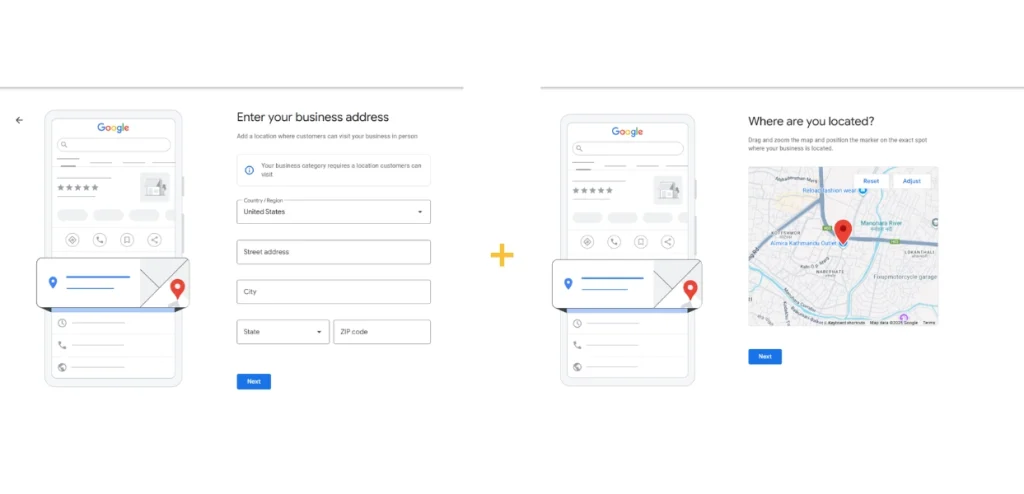
On the next page, enter your physical address if you serve customers at a location, or hide the address and define service areas if you operate remotely. For example, a residential plumber working across multiple suburbs can list service areas instead of displaying a home address.
- Step 5: Add Your Phone Number and Website

Enter your plumbing business phone number (a local phone number is preferred) and your official website URL. Make sure these details match the contact information used across other online listings, as consistent information helps improve local search performance and ensures customers can reach you directly from search results.
- Step 6: Request Verification From Google

Google requires verification to confirm that your plumbing business is legitimate and operating at the listed location. This process typically involves receiving a postcard with a verification code, though phone or email verification may also be available. Completing this step is required before your profile becomes publicly visible in search and map results.
Note: Postcard verification may take a few days, but phone or email verification is quicker.
- Step 7: Add Your Operating Hours

Once verified, set accurate business hours, including emergency or after-hours availability. For instance, a plumber offering 24-hour emergency service should clearly list extended hours to capture urgent searches.
- Step 8: Write Your Plumbing Business Description

Now, use the business description section to clearly explain what your plumbing company offers, who you serve, and what sets you apart. You have up to 750 characters to outline your services, years of experience, service areas, and any specialties such as emergency repairs or environmentally friendly plumbing solutions. Keep the content clear, focused, and relevant.
- Step 9: Upload Your Logo and Business Photos

Add your plumbing company logo along with genuine photos that represent your business, including service vehicles, technicians at work, and completed projects. You may also upload a 360-degree video of your physical location if applicable. Real visuals help customers recognize your plumbing business and build confidence before contacting you.
- Step 10: Choose Your Primary and Secondary Categories

Select “Plumber” as your primary category and add relevant secondary categories, such as drain cleaning services or water heater installation. Correct categories help Google show your business for the right search terms.
- Step 11: Connect Google Ads and Claim Any Available Credit (Optional)
After completing your profile, Google may offer advertising credits to new advertisers or businesses that have not used Google Ads recently. This credit allows you to test paid advertising without upfront costs. If you choose to use it, Google will walk you through setting up a simple ad campaign connected to your profile, helping your plumbing business appear prominently for searches that may not show local listings.
How to Optimize Your Plumbing Google Business Profile?
To optimize your plumbing Google Business Profile, ensure all business information is accurate, publish posts in a timely manner, engage with every review, and enable call features. Also, use local keywords such as “plumber in [City Name]” in your descriptions and service listings. Upload high-quality photos and videos, actively encourage and respond to customer reviews, and regularly post updates with promotions or helpful tips to keep your profile active and visible.
Steps to optimize your plumbing Google Business Profile:
- Step 1: Check and Update Your Categories
Review your primary and secondary categories to make sure they accurately reflect your plumbing services. Your primary category should remain set to “Plumber,” while secondary categories should reflect the specific services you actively provide, such as drain cleaning or water heater installation.
Correct category selection helps Google clearly understand what your plumbing business offers, which improves visibility in relevant local searches. For example, a plumbing contractor who adds “Water Heater Installation Service” as a secondary category is more likely to appear when homeowners search for water heater repairs.
- Step 2: Improve Your Services List
Use the services section to add a detailed and complete list of the plumbing work you perform. Instead of general descriptions, include clearly defined plumbing services that match how customers search. This improves relevance for service-specific queries and helps Google match your profile with the right search intent.
For instance, listing services such as leak detection, pipe replacement, and sewer line repair increases the likelihood of appearing when customers search for those exact plumbing needs.
- Step 3: Publish Posts For Offers, Updates And Seasonal Plumbing Issues
The Google Posts feature on GBPs allows you to directly engage potential customers and stand out from other business profiles. Regularly publish posts to share offers, service updates, and seasonal plumbing reminders directly on your profile. Active posting signals that your plumbing business is current and engaged, which can improve visibility and user interaction.
- Step 4: Reply To Every Review Directly In Your Google Profile
Responding to reviews shows that your plumbing business values customer feedback and maintains active communication with customers. Thank customers for positive reviews and reference the service they received to reinforce trust for future visitors. When handling negative reviews, address the issue professionally and offer a solution without sounding defensive.
For example, responding to a review about delayed service with a clear explanation and follow-up support helps protect your reputation and builds confidence among potential customers who read your responses.
- Step 5: Enable Call, Message And Booking Features
Turn on calling, messaging, and booking options within your profile to make it easier for customers to reach you. These features eliminate unnecessary steps and let users contact your plumbing business directly from search results. In urgent situations, such as a burst pipe, a homeowner can call or message you directly from their profile without visiting your website.
- Step 6: Upload High-quality, Recent Photos Regularly To Your Profile
Keep your profile visually up to date by uploading clear, recent photos of your plumbing team, service vehicles, and completed jobs. Fresh images help establish credibility and encourage users to engage with your profile. For example, sharing photos of recently completed bathroom plumbing work allows potential customers to see the quality and scope of your plumbing services.
- Step 7: Write a Keyword-Rich, Natural Plumbing Business Description
Update your business description using relevant plumbing services and service locations in a clear, natural manner. This helps Google categorize your plumbing business accurately while making it easy for users to understand what you offer. Mentioning services such as emergency plumbing, residential repairs, and the cities you serve improves relevance for local searches without sounding forced.
- Step 8: Use GBP Insights to See What’s Working
Review Google Business Profile insights to track how customers find and interact with your listing, including calls, searches, and profile views. This data helps you identify which services and updates generate the most interest. For example, if insights show an increase in calls after posting about drain cleaning, you can focus more on promoting that service to drive consistent engagement.
What are the Benefits of Google Business Profile for Plumbing Contractors?
A well-optimized Google Business Profile offers numerous benefits for plumbing contractors, including increased local visibility, enhanced trust, proper customer engagement, and free online marketing. These benefits work together to help plumbing businesses attract nearby customers, generate qualified service calls, and compete more effectively in local search results.
5 key benefits of Google Business Profile for plumbing contractors:
- Local Visibility
Google Business Profile helps plumbing contractors appear in local search results when customers look for nearby plumbing services. For example, when a homeowner searches for “emergency plumber near me,” a well-optimized GBP can appear in the local map results. This visibility puts your plumbing business in front of users actively looking to hire, often leading to more calls and service requests in your service area.
- Enhance Trust
A complete and active GBP helps plumbers establish credibility, as verified details, recent photos, and customer reviews allow potential customers to assess reliability before contacting you. For instance, a plumbing contractor with consistent five-star reviews and professional responses reassures homeowners that they are choosing a dependable plumbing service provider, which increases the likelihood of being contacted.
- Improved Customer Engagement
Google Business Profile enables direct interaction through calls, messages, and review responses. This makes it easier for customers to reach out when they need plumbing help. For example, a homeowner dealing with a leaking pipe can call or message directly from your profile, leading to faster response times and higher conversion rates for your plumbing business.
- Helpful Customer Insights
The insights section within GBP shows how customers find and interact with your plumbing profile, including search terms, call activity, and profile views. This information helps you understand which services attract the most attention. For example, if insights show frequent searches for drain cleaning, you can prioritize promoting that plumbing service to better align with customer demand.
- Free Online Marketing
Google Business Profile serves as a free marketing channel for plumbing contractors, enabling you to showcase services, updates, and photos without incurring advertising costs. Posting updates about seasonal services or recent jobs keeps your profile active and visible. As a result, your plumbing business can attract local leads consistently without relying solely on paid promotions.
How to Handle Multi-Location Plumber Google Business Profiles?
To handle multi-location plumber Google Business Profiles effectively, organize all locations under a single business group, add each location separately, and optimize each profile individually. This structured approach helps Google display the correct plumbing branch in local search results and allows customers to easily contact the nearest service team without confusion.
- Create Location/Business Group
Set up a business or location group in your Google Business Profile manager to organize all plumbing locations under one account. This makes it easier to control access, assign managers, and maintain consistency across locations while keeping centralized oversight.
- Add All Business Locations One by One
Create a separate profile for each plumbing location with its own address, phone number, and service area. This ensures Google can accurately match each branch with location-based searches, such as homeowners looking for a plumber in a specific city.
- Optimize Each GMB Profile Individually
Optimize every location profile with unique photos, local service details, business hours, and reviews. For example, one plumbing location may focus on emergency services while another highlights installation work. Individual optimization improves local relevance and increases lead generation for each branch.
Common Google Business Profile Mistakes Plumbing Contractors Should Avoid
Keyword stuffing, inconsistent business details, ignored customer interactions, and incorrect category selection are some of the common Google Business Profile mistakes plumbing contractors should avoid. These issues often confuse Google, reduce customer trust, and limit how frequently a plumbing business appears in local search results. Therefore, avoiding these mistakes helps maintain profile accuracy, improve local relevance, and support consistent lead generation.
7 common Google Business Profile mistakes plumbing contractors should avoid:
- Keyword-Stuffing: Google expects accurate business names, not service-heavy variations. Overloading the business name or description with keywords can lead to profile suspension.
- Inconsistent NAP and Duplicate Listings: Differences in business name, address, or phone number across listings confuse search engines and customers. Additionally, duplicate profiles can split ranking signals and reduce visibility.
- Ignoring Reviews, Q&A, and Messages: Failing to respond to reviews, questions, or messages signals poor engagement. Active interaction helps build trust and shows Google that the profile is being managed.
- Letting Your Profile Info Go Out of Date: Incorrect hours, outdated phone numbers, or old service areas can lead to missed calls and negative customer experiences.
- Assigning Wrong Categories: Choosing categories that do not reflect actual plumbing services reduces relevance. Incorrect categories can prevent your GBP profile from appearing in the right searches.
- Uploading Low Quality Media: Google favors clear, authentic media that represents real plumbing work, meaning blurry images, stock photos, or outdated visuals reduce credibility.
- Incomplete Business Details: Missing services, descriptions, or attributes limit how well Google understands your plumbing business. Therefore, complete profiles generally perform better in local results.
To avoid these mistakes and ensure proper setup and optimization of your plumbing Google Business Profile, working with a professional plumber digital marketing agency is often recommended. An experienced plumber digital marketing agency can handle setup, optimization, ongoing management, and monitoring to help your plumbing business maintain strong local visibility and consistent lead flow.